
SQLite Viewer & Editor
Our comprehensive review of SQLite Viewer & Editor for Windows. Discover how this developer tool simplifies database management, query building, and CSV imports.
Streamlining Database Management on Windows
Managing relational databases requires tools that are both lightweight and robust. The SQLite Viewer & Editor database manager by Central software is designed specifically for Windows users who need a direct, reliable way to interact with their SQLite files. Whether you are a developer debugging an application or a data analyst parsing local tables, this utility provides a complete suite of manipulation tools without the overhead of enterprise database suites.
Core Functions of the SQLite Viewer & Editor Database Manager
This software goes beyond basic file viewing, offering a deep set of features to inspect, alter, and refine your database structure and contents:
- Direct Schema and Table Editing: Easily create, drop, or alter SQLite tables. You can modify table schemas, clone table structures, or duplicate data with minimal effort.
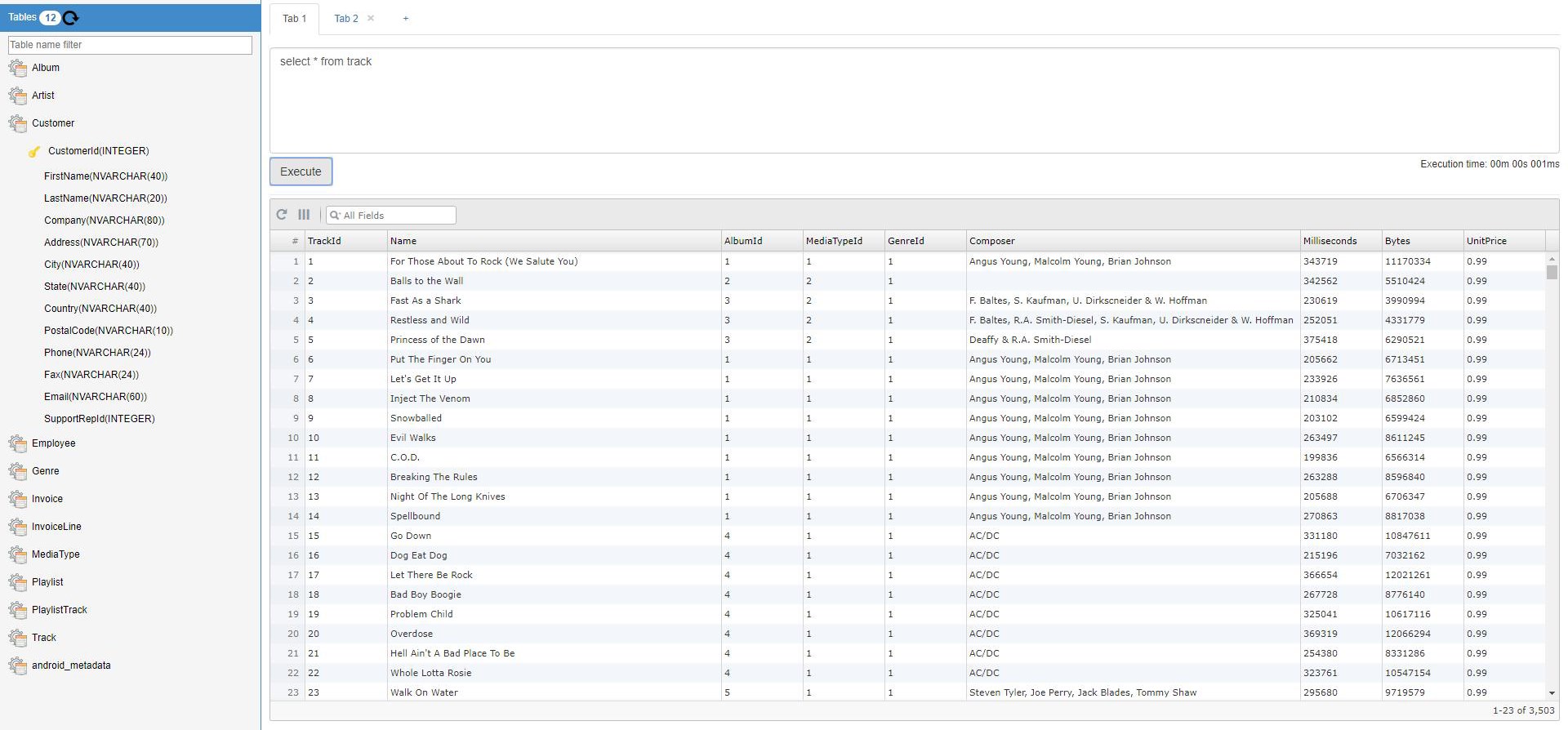
- Intuitive Data Browsing: View and filter your table data instantly. Sorting is as simple as tapping on column headers to toggle between ascending and descending order.
- Row-Level Operations: Add, delete, or update individual rows. Quickly copy any row to your clipboard with a simple double-tap interface.
- Automated and Manual Data Exchange: Import highly configurable CSV data directly into your existing tables, or export your table data back to CSV. For recurring workflows, you can even schedule an export to run automatically every night.
Advanced Querying and Database Control
For users who need to execute complex operations, the SQLite Viewer & Editor database manager includes a built-in Query Maker. This visual interface helps you construct custom queries, save them for future use, and clean up your workspace by deleting obsolete queries. The app also generates pre-populated SQL Select Queries for your existing tables, allowing you to view and copy table definitions, triggers, and views instantly from the database sidebar.
Who Is This Tool For?
Categorized under IT tools, this application is tailored for database administrators, software developers working with local storage, and IT professionals who require rapid schema prototyping on Windows. Its straightforward layout removes the steep learning curve often associated with command-line database tools, making local data manipulation accessible and highly efficient.
Get Started with SQLite Viewer & Editor
If you are looking for a practical, feature-rich utility to handle your local database workflows, this tool provides excellent value. To explore its features further or to add it to your development environment, visit the official Microsoft Store page to acquire the application.