
Gitnuro
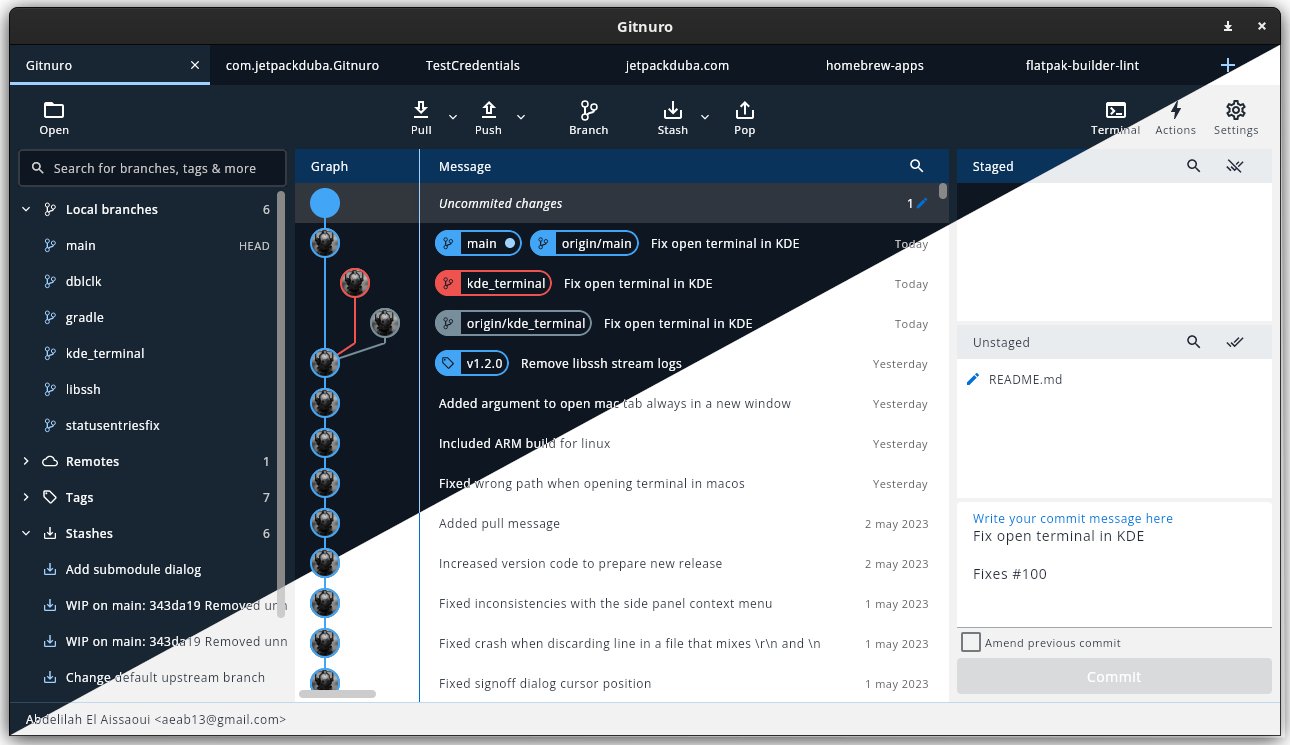
Read our comprehensive review of Gitnuro, a modern Linux Git client designed to simplify repository management with real-time visual tracking.
A Visual-First Approach to Version Control
For Linux developers, finding a balance between command-line efficiency and visual clarity can be challenging. The Gitnuro Git client bridges this gap by offering a highly visual, modern experience for managing multiple repositories. Created by developer Abdelilah El Aissaoui, this utility stands out by providing an elegant interface that transforms how you interact with your code history, making branching, staging, and committing feel incredibly intuitive.
Key Features of the Gitnuro Git Client
This application is tailored for developers who need to keep a close eye on their codebase without getting bogged down in complex terminal commands. Here are some of its standout capabilities:
- Multi-Repository Management: Seamlessly toggle between different projects and manage multiple repositories within a unified workspace.
- Live Visual Representation: View the exact state of your branches, commits, and stashes in real-time with clean, interactive diagrams.
- Modern User Interface: Enjoy a decluttered, native-feeling environment optimized for Linux desktop platforms.
- Streamlined Workflows: Perform common Git actions like staging, committing, and pushing with minimal friction.
Who is this Git Client For?
Whether you are a solo developer working on personal open-source projects or part of a larger team, maintaining a clear overview of your version history is vital. The Gitnuro Git client is particularly beneficial for those who find standard terminal outputs hard to parse quickly, as well as team leads who need to audit merge histories at a glance. Its placement in the IT tools category highlights its utility as a reliable, daily-driver developer tool.
Why Choose a Dedicated Graphical Interface?
While the command line remains a powerful tool, a dedicated graphical client excels at showing side-by-side diffs, complex merge trees, and staging specific lines of code. It reduces the cognitive load required to understand where your local branch sits relative to upstream remotes, ultimately helping you avoid costly merge conflicts and accidental overwrites.
Explore the Official Gitnuro Page
If you are ready to upgrade your Linux development workflow with a clean, visual-first version control manager, you can find more details, documentation, and installation links on the official Gitnuro Flathub page.